
RAG = Search + LLM generation
Retrieval-Augmented Generation (RAG) is an LLM architecture pattern that combines information retrieval with text generation.
Instead of relying only on a model’s frozen training data, RAG:
- Retrieves relevant documents from an external knowledge source at query time
- Injects that context into the prompt
- Generates an answer grounded in retrieved data
Core Components
- Embedding model → converts documents and queries into vectors
- Vector store → performs semantic similarity search
- Retriever → fetches top-K relevant chunks
- Generator (LLM) → produces the final response using retrieved context
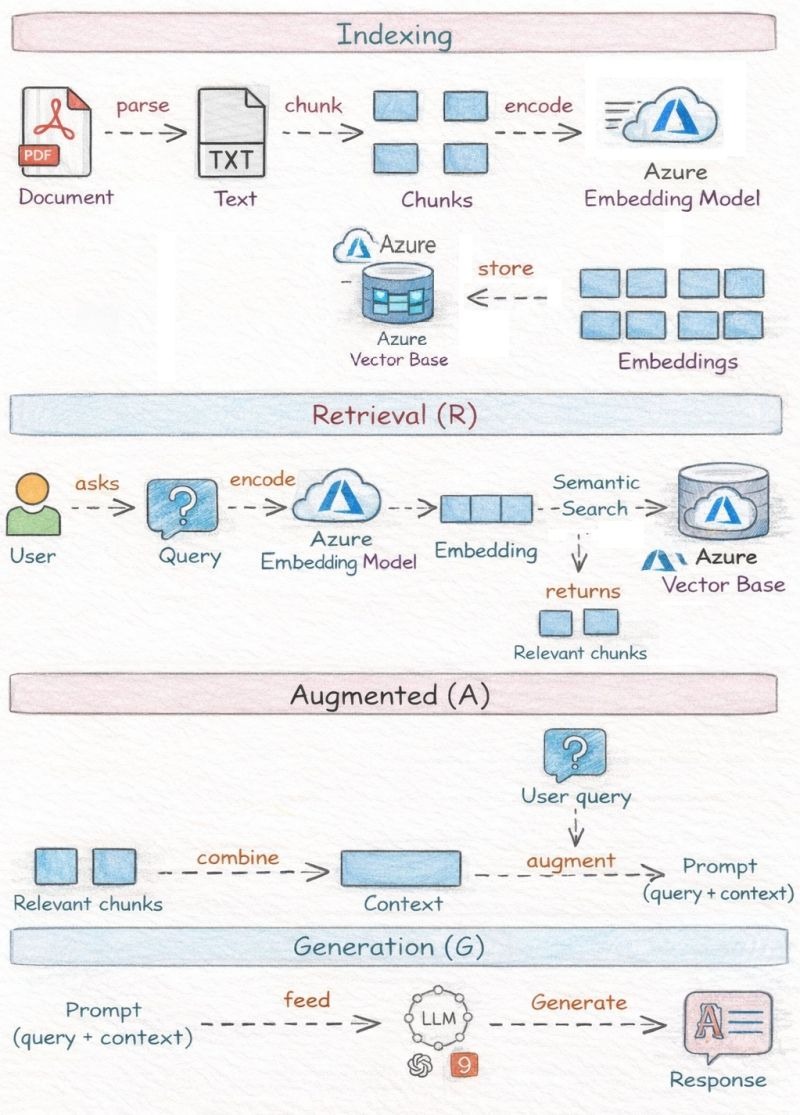
High‑level idea of RAG
RAG = Search + LLM generation
Instead of asking an LLM to answer purely from its training data, RAG:
- Retrieves relevant knowledge from your private data (documents, PDFs, wikis, etc.)
- Augments the prompt with that knowledge
- Generates a grounded, accurate answer
This avoids hallucinations and enables enterprise knowledge Q&A.
1️⃣ Indexing Phase (Offline / Preprocessing)
This happens before users ask questions.
Goal
Convert raw documents into a searchable vector index.
Step 1: Document ingestion & parsing
PDF / DOCX / HTML
↓ parse
Plain text
- PDFs, Word files, web pages, etc. are parsed into text
- Parsing removes layout noise (headers, footers, images)
- Output is clean text
✅ Why this matters
LLMs and embedding models operate on text, not binary formats.
Step 2: Chunking (critical design decision)
Text → Chunks (small passages)
- Large documents are split into chunks (e.g., 300–1,000 tokens)
- Often overlapping chunks (e.g., 20–30%) to preserve context
✅ Why chunking is needed
- Embedding models have token limits
- Smaller chunks improve retrieval precision
- You retrieve just the relevant part, not the entire document
✅ Typical chunk strategies
- Fixed-size tokens
- Semantic chunking (paragraph / heading based)
- Sliding window with overlap
Step 3: Embedding (semantic encoding)
Chunk → Azure Embedding Model → Vector
- Each chunk is passed to an Azure OpenAI embedding model
- Output is a high‑dimensional vector (e.g., 1,536 dimensions)
✅ What embeddings represent
They capture semantic meaning, not keywords.
Example:
- “How to reset password”
- “Steps to change login credentials”
→ very similar vectors
Step 4: Store in Vector Database
Embeddings → Azure Vector Store
Stored items typically include:
- Vector embedding
- Chunk text
- Metadata (document name, page, section, timestamp)
✅ Azure options
- Azure AI Search (vector + hybrid)
- Cosmos DB with vector search
- PostgreSQL + pgvector
✅ Outcome
You now have a semantic index of your enterprise knowledge.
2️⃣ Retrieval Phase (R – Runtime)
This happens when a user asks a question.
Step 1: User query
User → “How does leave approval work?”
Raw natural language question.
Step 2: Query embedding
Query → Azure Embedding Model → Query Vector
- The same embedding model used during indexing must be used here
- This ensures vector space consistency
✅ Important
Using different embedding models breaks similarity search.
Step 3: Semantic search in vector DB
Query Vector → Similarity Search → Top‑K chunks
- Cosine similarity / dot product used
- Returns most semantically relevant chunks
✅ Often combined with:
- Metadata filters (department, date, access level)
- Hybrid search (vector + keyword)
✅ Output A small set of relevant chunks, not documents.
3️⃣ Augmentation Phase (A)
This is the bridge between search and generation.
Step 1: Combine retrieved chunks
Relevant Chunks → Context
- Chunks are:
- Deduplicated
- Ordered
- Truncated to token limits
✅ Typical structure
Context:
[Chunk 1]
[Chunk 2]
[Chunk 3]
Step 2: Augment the user query
Prompt = System Instructions
+ User Query
+ Retrieved Context
Example:
You are an HR policy assistant.
Answer ONLY using the context below.
Context:
<retrieved chunks>
Question:
How does leave approval work?
✅ Why this is powerful
- LLM is forced to ground answers
- No reliance on model’s internal memory
- Enables citations & traceability
4️⃣ Generation Phase (G)
This is where the LLM produces the final answer.
Step 1: Feed augmented prompt to LLM
Prompt → Azure OpenAI GPT Model
- Model sees:
- The question
- The retrieved enterprise knowledge
- It does reasoning + language generation
Step 2: Generate response
LLM → Final Answer
✅ Characteristics of RAG responses
- Grounded in provided data
- Up‑to‑date (depends on index)
- Enterprise‑safe
- Explainable (can show source chunks)
🔁 Why RAG is superior to fine‑tuning for enterprise data
| Aspect | Fine‑tuning | RAG |
| Data freshness | Static | Real‑time |
| Cost | High | Low |
| Hallucination risk | Medium | Low |
| Source citations | Hard | Easy |
| Compliance | Risky | Strong |
🧠 Key architectural best practices
- Chunk size matters more than model choice
- Use hybrid search (vector + keyword) in production
- Add metadata filtering for access control
- Keep prompt instructions strict
- Log retrieved chunks for observability
✅ Final mental model
Think of RAG as:
“Search engine + LLM reasoning layer”
- Vector DB = semantic memory
- Embeddings = meaning encoder
- LLM = language + reasoning engine
Why RAG exists
| Problem | RAG Solution |
| LLM hallucinations | Ground answers in real data |
| Stale knowledge | Fetch live or frequently updated content |
| Private data | Keep proprietary data outside model training |
| Cost of fine-tuning | Avoid retraining models |
Production Use Cases Commonly Implemented with RAG
Below are real, production-grade RAG use cases that teams deploy—not demos.
1. Enterprise Knowledge Assistant
Use case
- Internal chatbot for policies, SOPs, wikis, Confluence, PDFs
How RAG helps
- Retrieves policy clauses or documents
- Answers with citations and source links
Production details
- Chunking by semantic sections
- Role-based access filtering at retrieval time
- Caching frequent queries
2. Customer Support & Helpdesk Automation
Use case
- Support bot answering FAQs, troubleshooting guides, and manuals
How RAG helps
- Grounds answers in official docs
- Reduces hallucinated instructions
Enhancements
- Confidence thresholds → fallback to human agent
- Query rewriting for vague user questions
3. Code & Developer Assistants
Use case
- Query internal repositories, APIs, and design docs
How RAG helps
- Retrieves relevant code snippets
- Explains logic using actual implementation
Key technique
- Repository-aware chunking (functions, classes)
- Metadata filters (language, repo, branch)
4. Legal / Compliance Search
Use case
- Contract analysis, regulation Q&A, audit prep
Why RAG is critical
- Exact wording matters
- Answers must be traceable
Production safeguards
- Source citation mandatory
- Retrieval-only mode for sensitive answers
5. Analytics & BI Natural Language Interface
Use case
- Ask questions over dashboards, metrics definitions, and data catalogs
RAG role
- Retrieves metric definitions before generating explanations
- Prevents semantic drift (“revenue” vs “net revenue”)
6. Healthcare / Scientific Literature Assistants
Use case
- Search clinical guidelines, research papers
(for example, Care plans for people who require care from care staff so that the person needing care and the staff can ask questions about how to cope or manage certain situations)
Why RAG
- Models cannot invent facts
- Must cite authoritative sources
Controls
- Strict context window limits
- Generation constrained to retrieved text
Typical Production RAG Stack
Common tooling used in real systems:
- Frameworks
- LangChain
- LlamaIndex
- LangChain
- Vector Databases
- Pinecone
- Weaviate
- FAISS
- Pinecone
- LLMs
- OpenAI
- Anthropic
- OpenAI
What Makes a RAG System “Production-Ready”?
Key differences from toy implementations:
- Advanced chunking (semantic, hierarchical)
- Hybrid retrieval (vector + keyword/BM25)
- Re-ranking models for precision
- Observability (retrieval quality, answer grounding)
- Security (PII filtering, ACL-aware retrieval)
- Evaluation pipelines (faithfulness, relevance, latency)
Summary (Executive View)
- RAG = Retrieval + Generation
- It grounds LLM outputs in trusted, up-to-date data
- It’s the default architecture for enterprise LLM applications
- Most real-world LLM products today are RAG-based
Re-ranking is a second-pass ranking that improves the quality of retrieved documents. Initial retrieval is fast but approximate. Re-ranking is slower but more accurate. You use both together: retrieve top 100 quickly with vectors, re-rank top 100 accurately with a stronger model.
=====================================================================
1️⃣ End-to-End Production RAG Architecture
High-Level Flow
A production RAG system has two pipelines:
- Offline indexing pipeline
- Online query pipeline
A. Offline Pipeline (Indexing Phase)
Step 1 — Data Ingestion
Sources:
- PDFs
- Confluence / SharePoint
- Databases
- S3
- Git repos
- APIs
Step 2 — Preprocessing
- Cleaning
- Deduplication
- PII masking (if required)
- Metadata enrichment (doc type, department, ACL tags)
Step 3 — Chunking Strategy
This is critical.
Common strategies:
- Fixed token windows (e.g., 512 tokens + overlap)
- Semantic chunking (split by section headers)
- Recursive chunking (hierarchical)
Poor chunking = poor retrieval.
Step 4 — Embeddings
Use embedding models from:
- OpenAI
- Cohere
- Google
Each chunk → converted into a dense vector.
Step 5 — Vector Store
Stored in:
- Pinecone
- Weaviate
- FAISS
- Milvus
Metadata indexing:
- department
- document version
- access control tags
- timestamps
B. Online Pipeline (Query Time)
Step 1 — User Query
Example:
“What’s the data retention policy for EU customers?”
Step 2 — Query Processing
- Query rewriting
- Expansion
- Intent detection
- Metadata filters (e.g., EU region only)
Step 3 — Retrieval
Modern systems use Hybrid Retrieval:
- Dense vector similarity
- BM25 keyword search
- Metadata filtering
Then:
- Re-ranking using cross-encoder models
Step 4 — Context Construction
Top-K chunks (e.g., 5–20) are:
- Deduplicated
- Ordered
- Compressed (if needed)
Inserted into prompt template:
You must answer using ONLY the context below.
If answer not found, say “Not found”.
Context:
[retrieved chunks]
Step 5 — Generation
LLM examples:
- OpenAI
- Anthropic
Output:
- Answer
- Citations
- Confidence score (optional)
Step 6 — Observability Layer
Track:
- Retrieval latency
- Answer faithfulness
- Token cost
- Query success rate
- Hallucination rate
Production systems ALWAYS include logging + evaluation.
2️⃣ RAG vs Fine-Tuning
Here’s the decision framework.
| Dimension | RAG | Fine-Tuning |
| Knowledge updates | Real-time | Requires retraining |
| Private data | Stays external | Embedded into weights |
| Hallucination control | High (if good retrieval) | Lower |
| Cost | Cheaper long term | Expensive training |
| Personalization | Metadata-based | Style-based |
| Domain knowledge depth | Moderate | Very deep possible |
When to Use RAG
- Dynamic knowledge
- Large document corpora (corpora – a collection of written or spoken texts)
- Need citations
- Compliance-heavy domains
- Enterprise data access control
When to Fine-Tune
- Tone/style control
- Structured output consistency
- Domain language modeling
- Classification tasks
- Reducing prompt length
Hybrid Approach (Common in Production)
Most serious systems:
- Use RAG for knowledge
- Fine-tune for behavior
Example:
Fine-tuned LLM + RAG retrieval backend.
3️⃣ Common Production Failure Modes
Now we move into real problems teams face.
1. Retrieval Miss (Most Common)
Problem:
Correct answer exists in corpus but not retrieved.
Causes:
- Bad chunking
- Embedding mismatch
- Query phrasing mismatch
- Top-K too small
Fix:
- Hybrid retrieval
- Query rewriting
- Better chunk granularity
2. Context Overload
Too many chunks → LLM confusion.
Symptoms:
- Blended answers
- Irrelevant info included
- Long but low-quality responses
Fix:
- Re-ranking
- Context compression
- Smaller top-K
3. Hallucination Despite Retrieval
LLM ignores context and fabricates.
Fix:
- Strict prompting
- Answer-only-from-context instructions
- Retrieval-only fallback mode
4. Access Control Leakage
User retrieves documents they shouldn’t.
Fix:
- Metadata-based ACL filtering before retrieval
- Zero trust design
5. Latency Explosion
Vector search + rerank + LLM = slow.
Fix:
- Cache embeddings
- Smaller embedding models
- Asynchronous re-ranking
6. Embedding Drift
Switching embedding models breaks retrieval quality.
Always re-embed full corpus if model changes.
4️⃣ Evaluation Metrics for RAG Systems
Evaluation must measure:
- Retrieval quality
- Generation quality
- End-to-end performance
A. Retrieval Metrics
Measured against labeled dataset.
- Recall@K – % of queries where correct doc in top K
- Precision@K – % of retrieved docs relevant
- MRR (Mean Reciprocal Rank)
- nDCG (ranking quality metric)
B. Generation Metrics
Key metric:
1. Faithfulness (Groundedness)
Is the answer supported by retrieved context?
Measured via:
- LLM-as-judge
- Fact overlap scoring
2. Answer Relevance
Does answer match question?
3. Hallucination Rate
% answers containing unsupported claims.
C. End-to-End Business Metrics
Most important in production:
- Task completion rate
- Escalation rate (to human)
- CSAT (if support bot) – A chatbot CSAT score specifically measures how pleased customers are with their interactions with your automated chatbot
- Cost per query
- Latency
D. Automated RAG Evaluation Frameworks
Used in production:
- LangChain
- LlamaIndex
- Weights & Biases
They help measure:
- Retrieval recall
- Groundedness
- Regression testing after updates
Final Executive Summary
Production RAG is NOT:
“Embed PDFs → call LLM → done.”
It is:
- Carefully designed ingestion
- Advanced retrieval strategies
- Context optimization
- Strict evaluation loops
- Continuous monitoring

Recent Comments